
Guide to Using sherloc’s Business Model Template
📌 What Is a Business Model (sherloc-Style)?
A business model is your plan for how your business will earn, spend, and grow—but done in a simple, structured way that reflects what’s really happening on the ground.
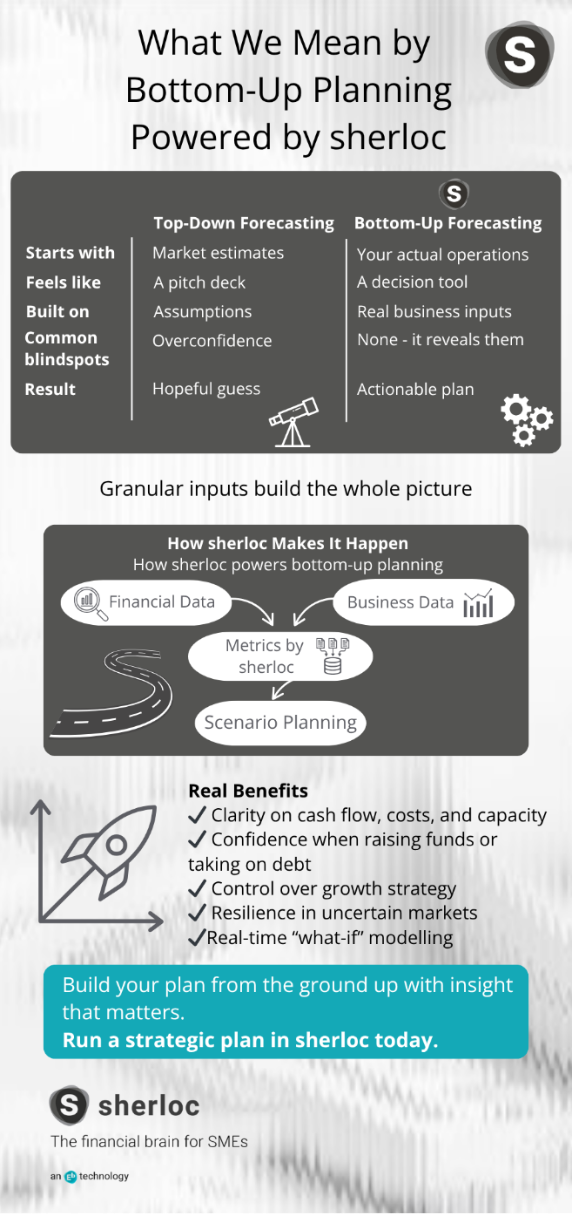
sherloc helps you use a bottom-up forecasting approach:
- Start with real-life data from your business
- Use the way you already budget naturally
- Connect to your management accounts for live updates
💡 Why This Template Matters
With sherloc, your model will:
Be based on real inputs, not estimates or guesses
- Link directly to your accounting data
- Help you run “what if” scenarios with confidence
- Build a clear, shareable plan that you can update weekly
🧱 Structure of the Template
The business model is split into three core areas:
1. Staffing (Headcount)
People are usually your biggest cost — and your biggest asset.
What to fill in:
- Name & Role
- Type of contract (PAYE or contractor)
- Team or location
- Cost type (direct cost or overhead)
- Gross salary (anchor column)
Why it matters:
This links into payroll and allows clear tracking of costs by team or office. sherloc lets you apply National Insurance, PAYE and benefits as clear assumptions — not hidden in a lump sum.
Tip: Don’t add overhead directly in salary — use the assumptions builder instead.
2. Non-Staff Costs
These cover everything from software to marketing to office space.
What to include:
- Cost type (e.g. marketing, software, consultancy)
- Sub-category (e.g. digital ads, events, printing)
- Provider name
- Annual budget (then split across months manually or evenly)
Tip: Add a 20% contingency row — better to overestimate than get caught short.
3. Sales & Revenue
Your plan for earning money — broken down in a way that makes sense to you.
You can track by:
- Product or service type
- Average sale price
- Monthly volume
- Cost of goods per unit (optional)
You can also split sales into different tabs for:
- Different locations (e.g. Manchester shop vs London shop)
- Separate teams or product lines
- Projects or revenue streams
Just keep the structure simple and consistent — sherloc can bring them together into one view later.
Tip: Anchor your pricing and volumes and let sherloc do the rest.
🧩 Bridging How You Budget Today → sherloc’s Business Model
✋ “I already do my own budget – what now?”
Brilliant — that’s a great starting point. Most founders already budget in some way, whether it’s in an Excel file, notebook, or even just in their head.
The good news? You can absolutely use your existing Excel-based budget with sherloc.
You just need to ensure you can roll up your sections into the same structure as your management accounts — typically grouped by:
- Staffing costs (e.g. PAYE salaries, contractors)
- Operating costs (e.g. marketing, software, premises)
- Sales/revenue lines (e.g. by product or service type)
Once that’s done, you can either:
- Copy your figures into the sherloc template, or
- Upload your own structured budget to be linked into your forecasts and assumptions
🔄 Here’s How to Map Your Budget to the Template:
How You Budget Now | Use This Tab in the Template | Where to Enter It |
| “We spend £2,000 a month on marketing” | Non-Staff Costs | Cost Type: Marketing, Budget: £24,000/year |
| “I’m hiring two staff at £35k” | Staff (Headcount) | Two rows, Salary: £35,000 each, PAYE |
| “We sell 100 units at £50 each” | Sales | Price: £50, Volume: 100 per month |
| “We hold 3 events at £500 each” | Non-Staff Costs | Cost Type: Events, enter manually in those 3 months |
| “We pay a contractor £2,000 monthly” | Staff (Contractor) | Role: [Job title], Contractor, Monthly cost: £2,000 |

🧠 Use Your Language
- Stick to categories you already use:
- If you track teams, use the “Team” column
- If you work by location, use the “Location” column
- If you plan by projects, label product lines or cost categories that way
🛠 Use the Assumptions Builder
Don’t hide logic in spreadsheets — instead:
- Add future hires, pay rises, or price changes as visible assumptions
- Make it clear where growth is coming from
- Let your team, accountant or investors follow your thinking
🔗 Download the Template
📥Click here to download the Excel Business Model Template
Upload your completed version into sherloc to bring it to life.
✅ Quick Wins and Final Tips
- Keep it simple — complexity = confusion
- Update weekly — it’s designed to be lived with
- Leave notes — future you (and your accountant) will thank you
- Build assumptions, don’t bury them — use the assumptions builder
- Over-plan > under-plan — better to budget for “maybe” than scramble later
- Split sales tabs — use separate tabs for different shops, teams, or products if that’s how you think about your business
- Use monthly detail for 2 years — then switch to annual figures for years 3–5 to keep your plan manageable